
Documentation
Sent documents
Documents
Sent documents
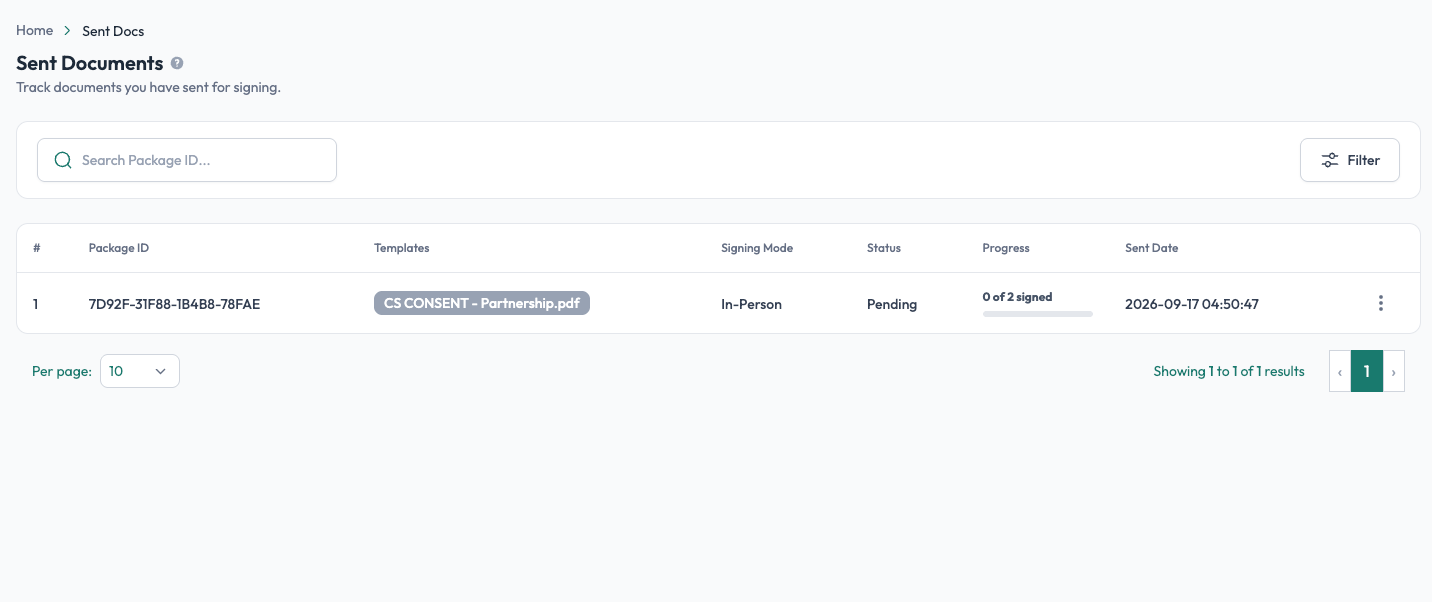
The Sent section is where you track signing requests that have been sent but are not yet completed or declined. It gives you a quick view of each request, its documents, signing mode, progress, and date.
A signing request can contain one or more documents and one or more signers.
What you see
The Sent Documents list shows key information for each signing request:
- Package ID: the unique ID of the signing request.
- Templates: the template or templates used in the request.
- Signing Mode: whether the request is In-Person or Remote via Email.
- Progress: how many required signers have completed their part.
- Sent Date: when the request was sent.
You can use Search to find a request by its Package ID and Filter to narrow the list.
Actions from the Sent Documents list
Use the ⋮ menu for a signing request to access available actions.
Depending on the signing mode and status, you may see options such as:
- Details: open the full details of the signing request.
- In-Person Links: access the links used for in-person signing.
- Delete: remove the signing request from the list.