
Completion certificate
A Completion Certificate is automatically generated when a signing request is fully completed. It provides a clear summary of the signing transaction and the people who completed it.
The certificate can be used alongside the signed documents as a convenient record of the completed signing process.
What the certificate contains
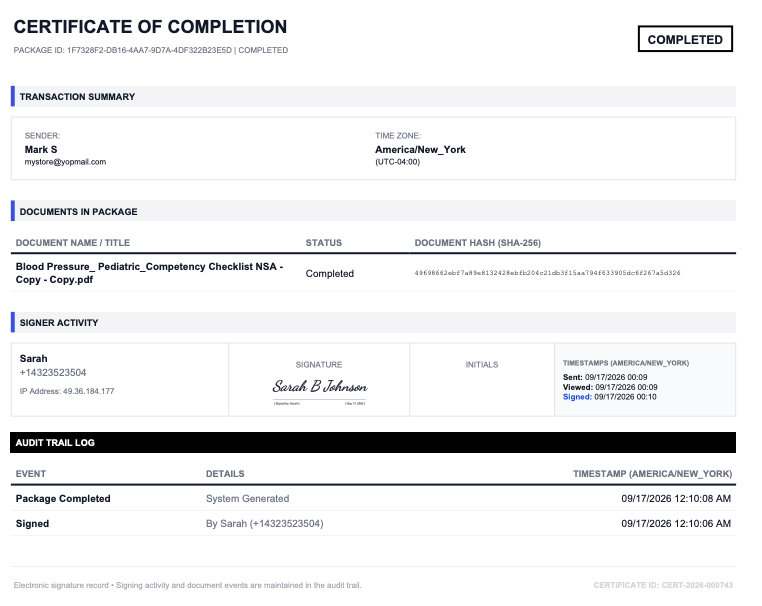
The certificate provides information about the signing request, including:
- Package ID: the unique identifier of the signing request.
- Sender: the account that created the signing request, including the sender's name and email.
- Time zone: the time zone used for the timestamps shown on the certificate.
- Documents in the package: the documents included in the signing request, their completion status, and their document hash.
- Signer activity: each signer's name, email address, IP address, signature, initials where applicable, and signing timestamps.
- Audit trail log: a chronological record of important events associated with the signing request.
- Certificate ID: the unique identifier of the completion certificate.
Certificate and signed documents
The completion certificate is generated as a separate record from the signed document.
For a completed signing request, you can choose how you want to download the completed records:
- All Signed Documents: download the completed signed documents.
- Certificate Only: download only the completion certificate.
- Docs with Certificate: download the signed documents together with the completion certificate.
You can also preview the available records before downloading them.
Where to find the certificate
Open a completed request from Completed Docs and select Details.
On the Package Detail page, use Download Documents to access the certificate and completed documents.
The certificate can also be downloaded separately when you only need the signing record rather than the signed document itself.
Certificate and audit trail
The Completion Certificate and Audit Trail complement each other:
- Completion Certificate: a concise, easy-to-read record of the completed signing transaction.
- Audit Trail: the detailed chronological record of activity during the signing process.
The certificate includes an Audit Trail Log section, while the audit trail provides the more detailed activity record for the signing request.
See Audit Trail.
When is the certificate generated?
The certificate is generated automatically when all required signers have completed the signing request.
There is no separate action required from the sender.
All required signers complete → Request becomes Fully Executed → Completion Certificate is generated.