
Audit trail for documents
The audit trail is the record of activity for a signing request. It keeps a chronological history of important actions taken during the signing process, including signer activity and when the request was completed.
It helps you understand who did what and when throughout the signing process.
What the audit trail records
The audit trail records events as the signing request progresses. Depending on the action, an event can include information such as the person's name, email address, IP address, and the date and time of the action.
For example, the audit trail can record:
- When a signing request was sent.
- When a signer accessed or viewed the request.
- When a signer signed.
- When a signer declined to sign.
- When the signing request was completed.
Each event is recorded with a timestamp so the signing activity can be reviewed in chronological order.
Signer activity
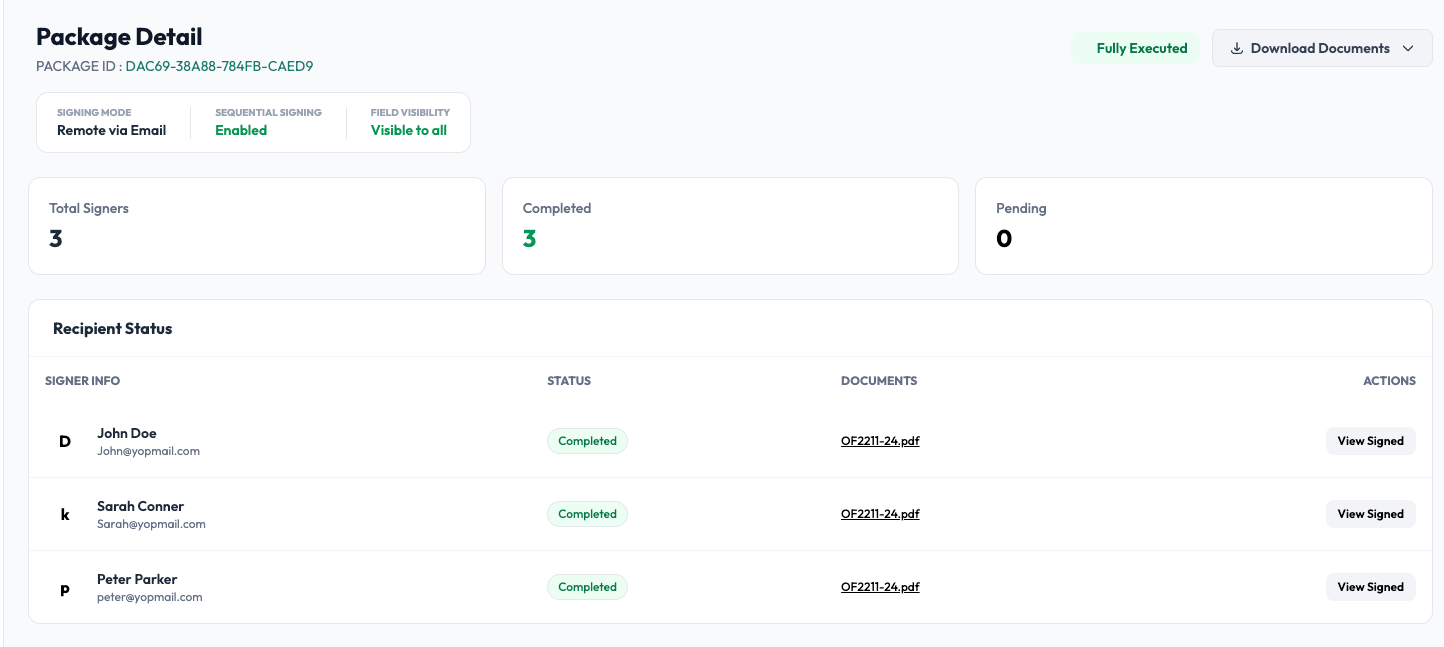
The audit trail works alongside the Recipient Status information shown on the signing request details page.
The details page shows the current status of each signer, while the audit trail provides the history of actions that led to that status.
For example:
Signer: John Smith
Status: Completed
Activity: Sent → Viewed → Signed
This makes it possible to review not only whether a signer completed their part, but also the activity associated with the signing request.
Accessing the audit trail
Open a signing request from Sent Docs or Completed Docs and select Details.
The Package Detail page provides the signing request's overall information, including its signers, signing mode, signing progress, and current status. The audit trail provides the detailed history of activity associated with the request.
For a completed request, the audit trail is also included in the signing records associated with the completed documents.
Audit trail and completion certificate
The audit trail and completion certificate serve different purposes.
- Audit trail: the detailed chronological record of activity during the signing process.
- Completion certificate: a concise summary of the completed signing transaction, including the documents, signers, signatures, and relevant timestamps.
The completion certificate provides a convenient summary, while the audit trail provides the underlying activity record.
Why the audit trail matters
A signed document shows the final result. The audit trail provides the history behind that result.
When you need to review a completed signing request, it can help answer questions such as:
- Who was asked to sign?
- Which signers completed the request?
- When did each signer sign?
- What signing activity took place before completion?
- When was the signing request completed?
Together, the signed document, audit trail, and completion certificate provide a complete record of the signing transaction.