
Completed documents
Completed Documents are signing requests where all required signing has been completed. Once the final signer finishes, Undersign marks the request as Fully Executed and makes the completed documents and supporting records available for download.
A completed request can contain one or more documents and one or more signers.
What you see
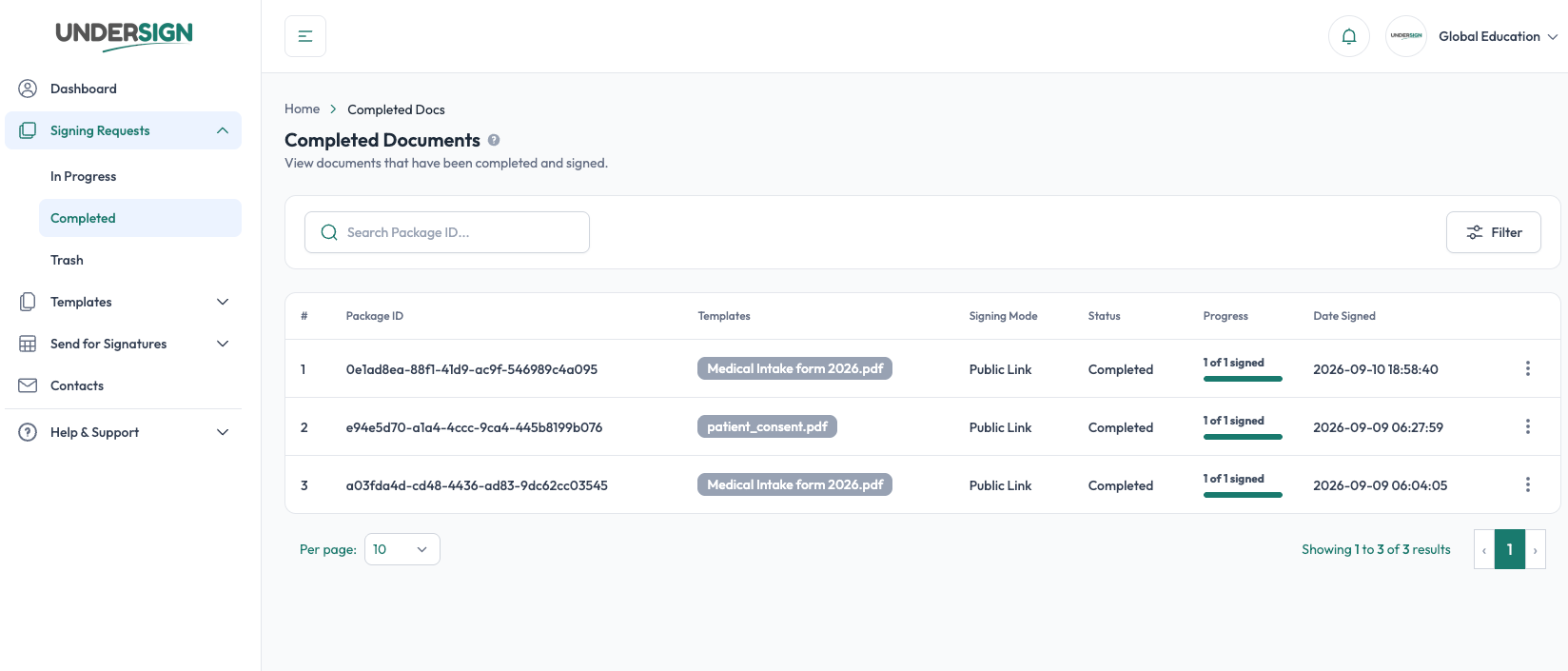
The Completed Docs list shows the key information for each completed signing request:
- Package ID: the unique ID of the signing request.
- Templates: the documents included in the request.
- Signing Mode: whether it was completed In-Person or Remote via Email.
- Progress: the number of signers who completed the request.
- Date Signed: when the signing was completed.
You can use Search to find a request by Package ID and Filter to narrow the list.
Open completed request details
Select a completed request to open its Package Detail page.
The page provides an overview of the completed signing request, including:
- Package ID and Fully Executed status
- Signing mode
- Sequential signing setting
- Field visibility setting
- Total number of signers
- Number of completed and pending signers
- Each signer's name, email, and completion status
- Documents associated with each signer
- Options to view signed documents
Download completed documents
The Download Documents menu provides different ways to download the completed signing records.
Depending on what you need, you can download:
- All Signed Documents: the completed signed documents.
- Certificate Only: only the completion certificate.
- Docs with Certificate: the signed documents with the completion certificate included.
You can also preview the available files before downloading them.
View signed documents
The Recipient Status section shows each signer and the documents associated with their signing.
When a signer has completed their part, View Signed lets you access the signed documents associated with that signer.
This is particularly useful when a signing request contains multiple documents or multiple signers.
Completion certificate and audit trail
A completed signing request also has its supporting signing records:
- Completion Certificate: a summary of the completed signing transaction, including the documents, signers, signatures, and relevant timestamps.
- Audit Trail: the detailed record of events that occurred during the signing process.
These records provide supporting evidence of how the signing request was completed.
See Completion Certificates and Audit Trail.
How requests become completed
A signing request moves to Completed automatically when all required signers have completed their assigned fields and signing actions.
There is no separate completion step for the sender.
For example:
2 of 2 signers completed → Fully Executed → Available under Completed Docs
The completed request remains available so you can review its details, access the signed documents, and download the certificate or other completed records.