
Managing bulk requests
Although they were created together, bulk requests remain independent signature requests: track the batch as a whole, and each recipient on their own.
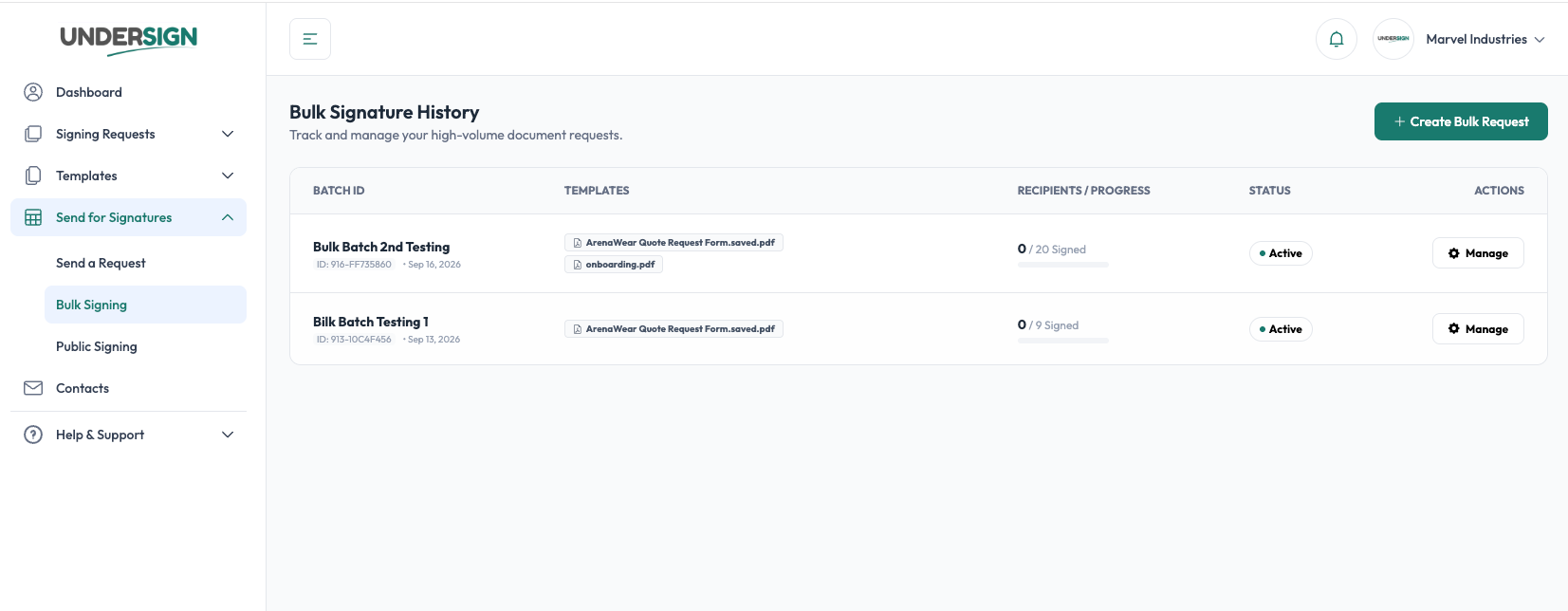
Bulk Signature History
Use Bulk Signature History to view previously created bulk requests.
The history provides an overview of:
- Batch ID
- Templates used
- Number of recipients
- Overall progress
- Batch status
- Available actions
The batch history is useful when managing high-volume signing operations because you can identify the batch without opening each individual signature request.
Bulk requests are not sent immediately. They are processed in the background one by one, so a newly created batch appears in the Bulk Signature History list after some time.
Individual requests
Each generated request has its own:
- Recipient
- Signing status
- Signing link
- Completion state
- Signed document
- Audit information
This means you can track the outcome of individual recipients without affecting the rest of the batch.
Failed requests
If an individual request fails to be created or delivered, the failure is associated with that request rather than the entire batch.
Where retry is available, the failed request can be retried without recreating the entire batch.
Bulk delivery depends on your SMTP server, which the application cannot control. If the server blocks or fails to send some emails, for example, 30 of 50 go through, Undersign receives no updates for the blocked ones, and only the delivered recipients will be able to sign.
This is particularly important for large batches because a problem affecting one recipient should not require the entire operation to be repeated.
Cancelling a bulk request
A bulk request can be managed at the batch level while individual requests retain their own status.
Cancelling outstanding requests stops those requests from continuing.
Requests that have already been completed remain completed, together with their associated documents and audit information.