
Template categories
Template categories help you organize your document templates into a clear folder-like structure, making it easier to find and manage templates as your library grows.
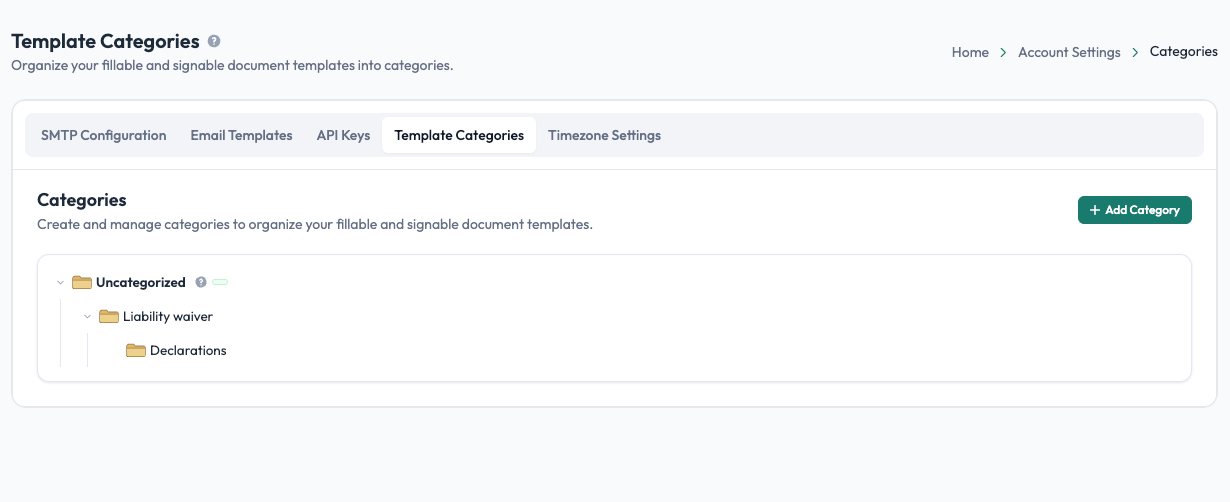
Categories are managed under Account Settings → Categories.
What template categories are
A category is a named group used to organize related templates. For example, you might create categories such as Application Forms, Staff Forms, Teacher Forms, or Contracts.
Categories can also be nested, allowing you to create a hierarchy that matches how your organization manages its templates. For example:
Staff Forms → Teacher Forms → 1st Std Forms
This makes large template libraries easier to navigate without relying only on template names.
Creating categories
From Account Settings → Categories, select Add Category and enter the category name. You can create categories at the top level or add them within an existing category to create a subcategory.
The page displays your categories in a tree structure, so you can expand and collapse levels as needed.
Managing categories
You can manage your category structure directly from the Categories page. Depending on the category, available actions can include:
- Add a subcategory: create another category inside it.
- Rename: change the category name.
- Delete: remove the category without deleting the templates themselves.
The Uncategorized group is available for templates that have not been assigned to a specific category.
Assigning templates to categories
When you upload a new template, you can select its category from the category tree. You can also change a template's category later from its template settings.
Categories are primarily used to keep your template library organized, so related templates can be found and managed together.
Tip: Keep the category structure simple and meaningful. Use categories based on how your team actually looks for templates rather than creating a separate category for every individual template.