
Email templates
Email Templates let you customize the content of the emails Undersign sends from your account. You can edit the subject and message body for different types of signing-related emails.
These settings are available under Account Settings → Email Settings.
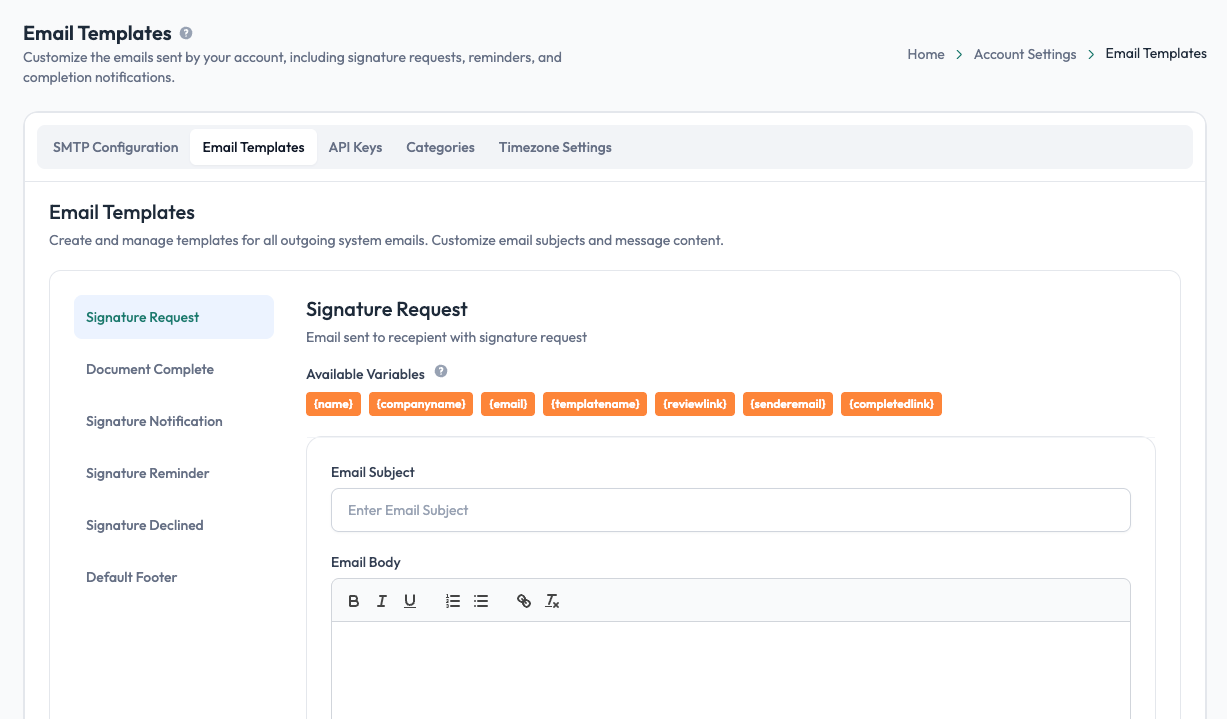
Available email templates
Undersign provides separate templates for different types of emails:
| Template | When it's used |
|---|---|
| Signature Request | Sent to a recipient when you send a signing request and ask them to sign. |
| Document Complete | Sent when a signing request has been completed. |
| Signature Notification | Used to notify recipients about signing activity or actions they need to take. |
| Signature Reminder | Sent as a reminder when a recipient has not yet completed their signing. |
| Signature Declined | Sent when a signing request has been declined. |
| Default Footer | The standard footer added to outgoing emails. |
Select a template from the list to view and edit its content.
Customize the subject and message
Each email template lets you customize:
- Email Subject: the subject recipients see in their inbox.
- Email Body: the main message sent to the recipient.
You can use the available variables to automatically insert information specific to the signing request.
For example, the Signature Request template can use variables such as:
{name}: recipient's name{companyname}: sender/company name{email}: recipient's email{templatename}: template name{reviewlink}: signing/review link{senderemail}: sender's email{completedlink}: link to the completed document, where applicable
These values are replaced automatically when Undersign sends the email.
Customize each email type separately
Each message type has its own template. Changes made to one template do not automatically change the others.
For example, you can use a detailed message for Signature Request, a shorter message for Signature Reminder, and a different message for Document Complete.
Default footer
The Default Footer can be configured separately and used as the standard footer for outgoing emails.
This allows you to keep common information consistent across the different email messages sent by your account.
Account-wide vs. individual messages
Email Templates define the default content for your account.
When creating an individual signing request, you may also be able to customize the message for that particular request. Individual message customization can therefore be used when a specific signing request needs different wording from your account's default email template.
Keep your email messages clear
Use straightforward subject lines and explain clearly what the recipient needs to do. In particular, make sure the Signature Request email makes it obvious that the recipient has been asked to review and sign a document.
Email templates control the message content; your configured SMTP settings control the email server and sender address used to deliver those messages.